Edit a stranger's app, and it's yours
You land on someone else's vibe, change one line, and hit save. You don't own it — so where does that edit go? Every Vibe lives at one /vibe page, and two very different people show up to the same URL: the owner, who wants to keep editing, and a visitor, who wants to make the thing their own. For a while those two stories pulled the page in opposite directions. This is how we untangled them, so the page does the right thing no matter which person you are.
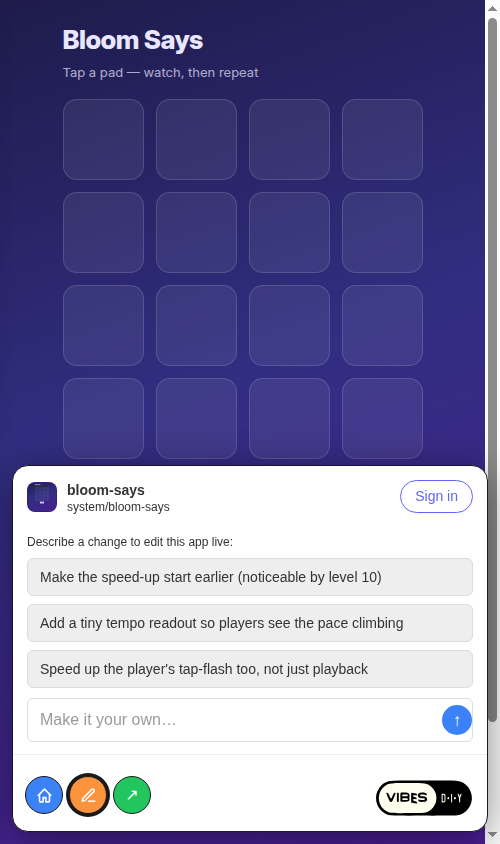
/vibe switch, expanded on mobile. A visitor gets a "Make it your own…" box, edit suggestions, and one-tap Home / Edit / Share — the same surface the owner uses to keep building. (App: bloom-says.)A visitor edits, and the app quietly becomes theirs
Start with the visitor. You're signed in, you're looking at someone else's app, and you type a change into the "describe a change" box or tap a suggestion chip. What should happen?
The obvious wiring was to send every edit straight to the owner's chat. That silently dead-ends for the most common case: a non-owner cannot write the owner's chat. The server looks up the chat session by (userId, chatId), and a non-matching userId gets rejected outright — "Creation Chat ID not found." The prompt was a write into a session that isn't yours. You can't generate first and fork on save, because the generation never lands.
So ownership decides at the moment of the write. A non-owner's edit forks — it makes the app theirs, and the change happens in the copy. The route's handleEditPrompt branches on isOwner: the owner edits in place; the non-owner gets routed through a fork.
We didn't build a new backend for this. The /remix route already calls forkApp — a code-only copy to your handle with a remixOf anchor recording where it came from. It already does the login gate (login-on-first-write, for free) and seeds the lineage. The seamless version on /vibe reuses that machinery verbatim and just changes the destination: instead of landing in a chat, you land on the fork's own /vibe page and the generation fires there. For a signed-in visitor, the card never even unmounts — the URL becomes /vibe/$yours/$forkSlug, and the iframe de-blurs into your fresh copy. (Logged-out visitors keep the existing /remix hop, which already handles the sign-in round-trip; the seamless logged-out path is a deliberate follow-up.)
/vibe/$yours/$forkSlug and the iframe de-blurs into your copy.isOwner resolves true on the page you now own.The detail that makes this clean is that the prompt rides the URL, not component state. Your typed change gets base64-encoded into ?prompt64 on the fork's URL. The forked page decodes it once isOwner resolves true, fires the generation, then scrubs the param so a reload doesn't re-fire it. Because the prompt lives in the URL, it survives the navigation, the fork, and even a Clerk sign-in redirect without any closure to carry.
Get posts like this in your inbox
One email field. Real updates. No algorithm required.
isOwner is the safety gate, and it's checked twice — the chat hook is enabled: isOwner, and the auto-fire effect is also gated on isOwner. On the owner's original app a visitor is isOwner: false, so nothing fires there. Codegen only ever happens on a page you actually own. One predicate enforces the whole constraint at both layers.
There was a sharp lesson in shipping it. The auto-fire guard started as a useRef(false) "fire once" — but React Router reuses the /vibe component across vibe-to-vibe navigation, so a second fork in the same session found the ref still true and silently dropped the prompt. "Once per page" became "once per session" by accident. The fix is to reset the ref in the slug-keyed effect: any one-shot ref on a reused route has to reset on the route key, or it isn't one-shot at all.
Before the fork existed: a merge checkpoint
The fork didn't arrive all at once. Before in-page live editing was built, the card's chips and "describe a change" box still needed somewhere to send your intent. Rather than block the whole feature on the hard part, we made a checkpoint: encode the prompt to prompt64, hand off to the chat route that already speaks it, and pre-fill the composer rather than auto-submit. Landing with the prompt seeded — you tap send — is strictly lower risk than firing a codegen turn on navigation. It reuses the same setPromptIfEmpty path the restyle flows use, so an incoming prompt never clobbers a half-typed message. That checkpoint is what later grew into the seamless fork.
An owner has a draft, and publishes it in one tap
Now flip to the owner. After you generate in place, your latest is a draft — a dev row — while the public still sees your last published version. That's the right default, but it raised two questions: can you see your own draft, and how do you ship it?
The principle that kept the first slice small: the only thing draft state changes is owner-only read. No viewer-aware serving, no new gating in the worker. The public surface is byte-for-byte unchanged, because server-side resolution still defaults to published. The owner's draft read is strictly opt-in — the /vibe route asks for selectMode: "ownerLatest", and the server only honors it for the authenticated owner. A non-owner who asks for it falls back to published and never sees the draft. The no-leak guarantee is a server check plus a test, not a frontend convention.
We resisted the tempting shortcut of making the resolver just "prefer the newest row," which would have regressed every published-state callsite that depends on production semantics. The draft badge needs no new response field either — mode already encodes it. ownerLatest returns a dev row exactly when there's an unpublished draft, so res.mode === "dev" is the draft signal: pin that fsId, show the "Draft · unpublished" badge. SSR paints the production iframe first (correct for everyone), then a single effect re-pins to the draft once isOwner resolves — no production-to-draft-to-production flicker.
Publishing turned out to hide a subtle trap. The obvious move — flip the chosen row's mode to production — is wrong, because the entry point picks the highest releaseSeq production row. Flip an older version in place and it keeps its old low sequence, so a newer production still out-ranks it: the version you "published" wouldn't actually serve. So publishApp doesn't demote anything. It mints a new production row at releaseSeq = MAX+1 carrying the chosen content. Old rows stay as history; the new top-of-stack simply wins. One uniform rule that's correct whether you're publishing the latest draft or re-releasing an explicit older version.
The release allocator normally deduplicates on fsId, which is exactly what publish must not do — publish wants a second row with the same content and a fresh sequence — so it gets its own insert path without the dedup guard, while still taking the same per-app advisory lock so a double-tap or a concurrent codegen write can't race the MAX+1 allocation. And the badge clears itself: after publish mints a newer-created production row, ownerLatest resolves that, mode flips back to production, and the banner vanishes. The publish handler never tells the client "you're up to date" — the client just re-runs the same resolver and the truth falls out.
One more owner control got wired up the same week. The in-card Share view had a Public / "people you approve" toggle that looked live but only popped the legacy modal and read a stale loader hint. We made it real by routing the write through the hook that already owns app settings — flip optimistically, roll back with a toast on error — and sourcing the displayed value from the persisted setting once it loads, so it sharpens into place instead of flashing. Notably, there's no iframe refresh on this toggle: changing public access affects other viewers, not your own access, so there's nothing to re-resolve for you. Knowing when not to copy a previous pattern matters as much as reusing it.
Indicators that tell you which hat you're wearing
All of this only works if you can tell, at a glance, who you are on a given page. So the card carries small mode indicators, driven entirely by role data the route already had — no new state, just a pure mapping.
The viewer-mode glyphs follow the grant-to-surface table: an author gets a shield, a read-only member gets a lock, a plain visitor gets nothing. The roster shows each member's role read-only (mirroring the existing "editor"/"reader" convention), because the members API returns only { displayName, role } by design — a per-member manage menu would need a new backend endpoint, so it's a deliberate later step. The admin-mode indicator completes the trio: when an owner toggles the full access-fn bypass, the plain muted author shield becomes a filled amber one that takes precedence. The toggle itself stays in the Share controls; the card only reflects the state, it doesn't own it.
Every one of these glyphs is accessible — role="img" with an aria-label like "Owner," "Read-only," or "Admin mode," so the mode is announced, not just colored. Same icon family, unmistakable state.
Finally, the handle tag at the top of the card — @you ▾ — became a real switcher. The dropdown reads "Acting as," lists your handles with the active one checked, and offers "New handle." The surprise was how little it needed: there's no setActiveHandle API, because the "active handle" is just your defaultHandle user setting, which the server already honors when attributing writes. Switching handles is a one-line settings upsert. And because ownership is account-level, switching your active handle never changes isOwner — isOwner checks any of your bindings against the route owner, separate from which handle you're acting as.
The throughline
The same /vibe URL now reads as the right thing to everyone who lands on it. A visitor's edit makes the app theirs without a detour. An owner's draft is private until they publish, and publishing mints a clean new top-of-stack instead of quietly losing to an old one. And a row of honest little indicators means you never have to guess whether you're the author, an admin, or a guest. The page meets you where you are — which is exactly what "make it yours" is supposed to feel like.
Open any app. Make it yours.
Land on a Vibe, type a change, and watch it fork to your handle — or publish your own draft when it's ready.
Start building →