VIBES.DIY For Trades & Contractors · five jobsite tools
For Trades & Contractors

Stop losing jobs
to a clipboard.

Five jobsite tools for HVAC techs, electricians, plumbers, and permit runners. Commissioning checklists, punch lists, service forms, and materials builders— built for the work, not the office.

// spotlight — hvac install check
JOB 01 · hvac-install-check

HVAC
Install Check

Equipment in, commissioning done,
customer signed off.

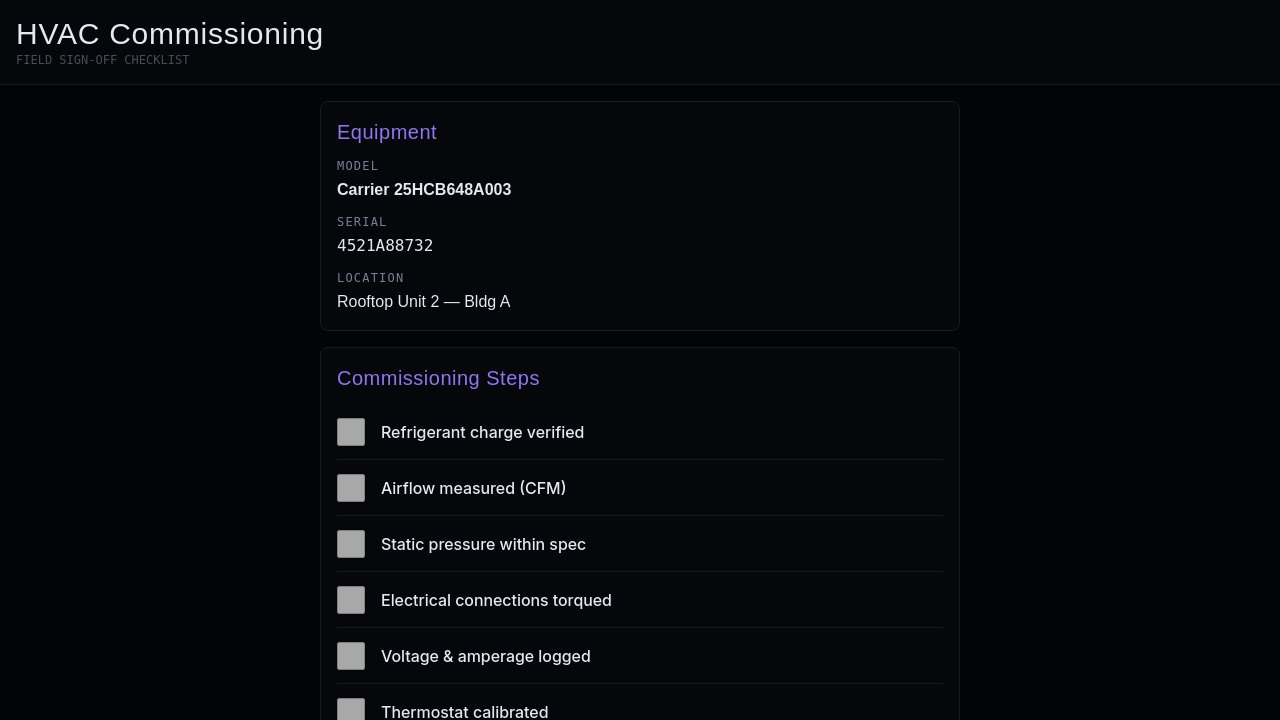
Every commissioning step with checkboxes, equipment model and serial number, customer info, and a final sign-off summary. Tech completes it on-site, customer gets the summary before you leave the driveway. No paper, no re-keying.

Open Checklist →

Works for refrigeration commissioning, boiler startup, or any trade that signs off on equipment — clone it and rename the fields.

Apps
Five
Audience
Trades
Persistence
Fireproof
Skin
Vault
// more jobsite tools
02
Live

Electrical Punch Log

Rooms as sections. Every item: location, status, who owns it.

Electrical punch list tracker. Rooms as sections. Each item: location, description, status (open/in progress/done), and who's responsible. Designed for trim-out phase to closeout.
electrical-punch-log // start fresh from this prompt — describe your version instead

Running commercial finish-out where items are by zone, not room? Clone it and restructure the sections.
03
Live

Plumbing Service Form

Parts used, labor notes, customer summary — one form.

Plumbing service call form. Capture: customer name, address, problem description, parts used with quantity, labor notes, and a customer-facing summary to share after the visit.

plumbing-service-form // start fresh from this prompt — describe your version instead

Your company texts the customer a summary link instead of handing them paper. Clone this and add a share-link output.

04
Live

Permit Tracker

Jurisdiction, docs, submission, inspector notes — in one place.

Permit and inspection tracker for a job. Fields: jurisdiction, permit type, required documents checklist, submission date, status, inspector notes, and next action.

permit-status-tracker // start fresh from this prompt — describe your version instead

Multiple active jobs with overlapping jurisdictions and inspection windows? Clone it and add a project-level view across all permits.

05
Live

Materials Builder

Pick job type. Build parts list. Send to the supply house.

Materials and parts list builder per job type. Select job type, then build a standard parts list. Add job-specific extras. Export a clean list for the supply run.

materials-order-builder // start fresh from this prompt — describe your version instead

Your supply house uses item numbers, not descriptions. Clone this and add a part-number column alongside each line item.

Every trade runs differently. Clone whichever is closest and describe your version — your form fields, your workflow, your customer handoff.

// read me

Tradespeople already run their jobs on whichever clipboard is closest— a paper punch list, a text thread with the GC, a mental parts checklist. These five apps do the same jobs without the paper, the re-keying, or the “where’s the form?” call at the end of the day. Clone any one, adjust it to your trade and workflow, have it running before the next job.